post view
Robotics Software That Survives Contact With the Real World: ROS 2, Gazebo, and C++ Plugins
A practical look at ROS 2, Gazebo simulation, and small C++ plugins: how to use simulation as an engineering tool instead of a pretty demo.
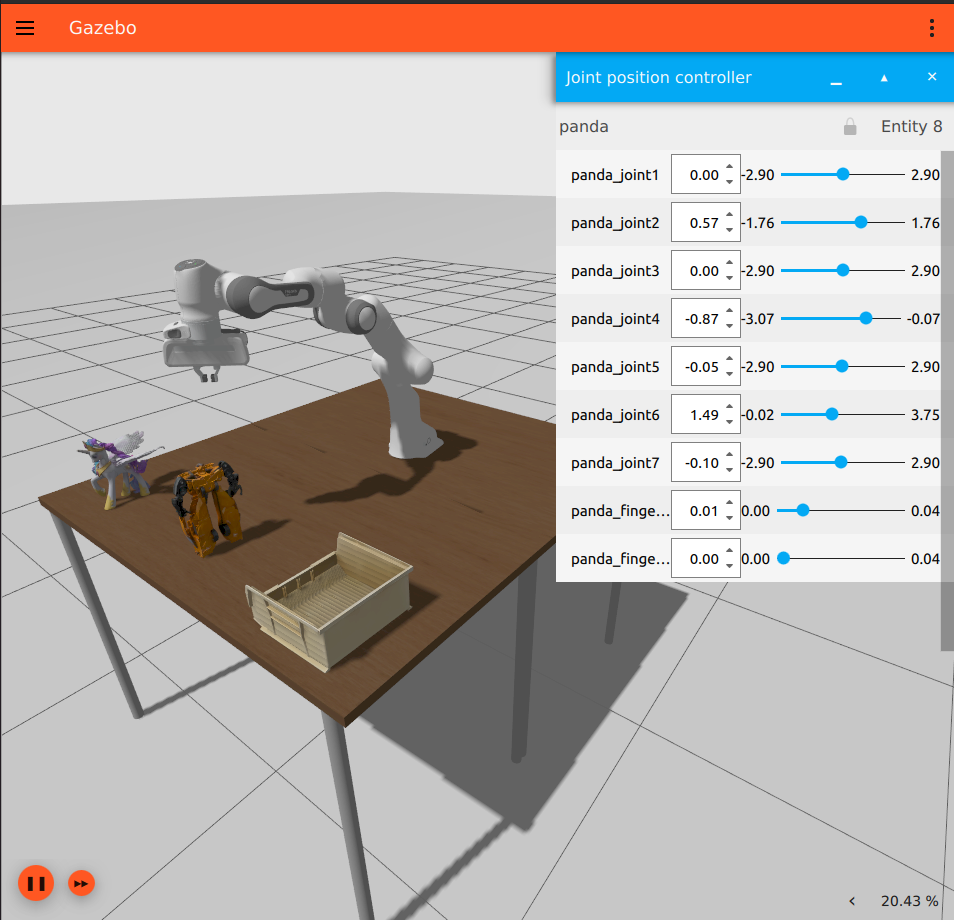
robotics-ros2-gazebo-cpp-plugins.md The best robotics simulation I ever used was not the one that looked the most realistic.
It was the one that made the robot fail early.
That sounds a little backwards until you have spent time debugging a real machine. Real robots do not care that the demo looked smooth on a laptop. They care about timing, frames, cable routing, controller limits, bad calibration, noisy sensors, startup order, and all the little assumptions that hide between “the node is running” and “the cell is actually safe.”
This is where ROS 2, Gazebo, and a few carefully placed C++ plugins become useful. Not as a replacement for the robot, and not as a digital twin fantasy. More like a workbench: fast enough to repeat, close enough to expose mistakes, and flexible enough to test the weird cases before hardware gets involved.
The stack in one sentence
If I had to describe the stack without the usual brochure language:
ROS 2 gives the robot software a nervous system.
Gazebo gives that nervous system a body and a world.
C++ plugins fill the gaps where the world needs behavior, not just geometry.
That split matters.
ROS 2 is where I want the long-lived application logic: planning, perception, task coordination, diagnostics, lifecycle management, and integration with the rest of the cell. Gazebo is where I want physics, sensors, contacts, joints, controllers, and repeatable worlds. Plugins are the escape hatch when a model file is not expressive enough.
The mistake is letting those boundaries blur until every problem becomes a plugin, or every simulated behavior becomes a ROS node with a pile of timing assumptions. That works for a demo. It ages badly.
Why ROS 2 is the right center of gravity
ROS 2 is not just “ROS with DDS.” The useful part is that it forces you to think about a robot as a distributed system.
That sounds abstract, but it shows up in very practical ways:
- topics and services make data flow visible
- actions fit long-running robot work better than blocking service calls
- lifecycle nodes make startup and shutdown less mysterious
- parameters keep tuning out of recompiles
- QoS forces you to say what kind of communication you actually need
use_sim_timelets simulated time drive repeatable tests
The last two are easy to underestimate.
QoS is often the difference between a simulation that “randomly” misses sensor data and one that behaves predictably under load. Simulated time is the difference between a test that can be replayed and a test that depends on whatever the laptop was doing that afternoon.
When I wire a simulation, I try to keep the ROS graph honest:
/joint_states         -> robot_state_publisher -> /tf
/scan or /camera/*    -> perception nodes
/cmd_vel or actions   -> controllers
/diagnostics          -> monitoring
/clock                -> every node using simulated time
If the graph is confusing in simulation, it will not magically become clear on the robot.
What Gazebo is good at
Gazebo is useful because it gives you a world that can push back.
A robot model in isolation is not enough. The moment you add gravity, friction, contact, sensor update rates, latency, and collision geometry, you start discovering the boring problems. Boring is good. Boring problems found in simulation are cheaper than boring problems found while someone is standing next to a moving machine.
For me, Gazebo is strongest when it is used for questions like:
- does the robot hit the fixture when the path is not perfect?
- does the controller tolerate a slower sensor update rate?
- does the state estimator recover after a short dropout?
- does the navigation stack behave when the map is slightly wrong?
- does the gripper logic handle a part that slips, tilts, or is missing?
That is different from chasing photorealism. Pretty rendering can help when cameras are involved, but physics and timing are usually the first place I look.
A practical workflow
The workflow I trust is small and iterative.
First, get the robot model loading. Keep it plain. Good visuals are nice, but collision geometry, inertial values, joint limits, and frame names matter more.
Then add one sensor or controller at a time. Bring it into ROS 2 through the normal interface. Check it with command-line tools before building application logic around it.
ros2 topic list
ros2 topic echo /clock
ros2 run tf2_tools view_frames
ros2 topic hz /joint_states
After that, start pushing the scenario:
- Run the happy path.
- Add one bad condition.
- Watch what fails.
- Fix the contract, not just the symptom.
The “bad condition” can be simple: a delayed sensor, a blocked path, a dropped object, a noisy pose estimate, a joint limit reached sooner than expected. You do not need a huge fault-injection framework to learn something useful. You need one controlled failure that tells you whether the robot software knows what is happening.
Where custom C++ plugins belong
Gazebo already gives you a lot through SDF, sensors, systems, and existing plugins. I only reach for custom C++ when the behavior belongs inside the simulated world.
Good reasons:
- a simulated sensor needs a custom signal
- a fixture has state that depends on contact or timing
- a conveyor, gripper, door, or tool needs world-side behavior
- a test needs repeatable disturbance injection
- the simulation needs to publish a small diagnostic topic
Bad reasons:
- hiding application logic because it was faster than writing a ROS 2 node
- hardcoding scenario state that should live in launch or parameters
- bypassing the same interfaces the real robot uses
The plugin should be boring. Load, read config, attach to an entity, do one job, publish or mutate only what it owns.
Here is a small modern Gazebo system plugin sketch that publishes a ROS 2 heartbeat every 100 simulation iterations. It is not a full package, but it shows the shape: configure once, act during simulation updates, keep the ROS 2 boundary explicit.
#include <memory>
#include <string>

#include <gz/plugin/Register.hh>
#include <gz/sim/Model.hh>
#include <gz/sim/System.hh>
#include <rclcpp/rclcpp.hpp>
#include <std_msgs/msg/string.hpp>

namespace lab
{
class TickPublisher final
  : public gz::sim::System,
    public gz::sim::ISystemConfigure,
    public gz::sim::ISystemPostUpdate
{
public:
  void Configure(const gz::sim::Entity &_entity,
                 const std::shared_ptr<const sdf::Element> &,
                 gz::sim::EntityComponentManager &_ecm,
                 gz::sim::EventManager &) override
  {
    model_ = gz::sim::Model(_entity);

    if (!rclcpp::ok()) {
      rclcpp::init(0, nullptr);
    }

    node_ = std::make_shared<rclcpp::Node>("gazebo_tick_publisher");
    pub_ = node_->create_publisher<std_msgs::msg::String>("/sim/tick", 10);

    RCLCPP_INFO(
      node_->get_logger(),
      "Attached TickPublisher to %s",
      model_.Name(_ecm).c_str());
  }

  void PostUpdate(const gz::sim::UpdateInfo &_info,
                  const gz::sim::EntityComponentManager &_ecm) override
  {
    if (_info.paused || _info.iterations % 100 != 0) {
      return;
    }

    std_msgs::msg::String msg;
    msg.data = model_.Name(_ecm) + " tick " + std::to_string(_info.iterations);
    pub_->publish(msg);

    rclcpp::spin_some(node_);
  }

private:
  gz::sim::Model model_{gz::sim::kNullEntity};
  rclcpp::Node::SharedPtr node_;
  rclcpp::Publisher<std_msgs::msg::String>::SharedPtr pub_;
};
}

GZ_ADD_PLUGIN(
  lab::TickPublisher,
  gz::sim::System,
  lab::TickPublisher::ISystemConfigure,
  lab::TickPublisher::ISystemPostUpdate)
Loaded from SDF, the plugin is just another part of the simulated model:
<plugin filename="libtick_publisher.so" name="lab::TickPublisher" />In real code I would add parameters, avoid owning global ROS shutdown from inside the plugin, and use a proper executor if subscriptions, timers, or services are needed. For a heartbeat publisher, this is enough.
The details that usually bite
The problems that waste time are rarely exotic.
Frame names drift. A sensor publishes data in one frame, the planner expects another, and the transform tree “mostly” works until the robot rotates.
The simulation runs too clean. Perfect odometry, perfect contact, perfect perception, and zero latency produce software that is brave for the wrong reasons.
QoS is guessed. A camera topic, a command topic, and a latched configuration topic should not all use the same communication profile.
The plugin becomes a second application. Once a plugin starts planning tasks, reading business rules, or managing robot state, the boundary is probably wrong.
The model lies. Bad inertia values and lazy collision meshes can make a controller look broken when the problem is the model.
I like writing these down in the repository, close to the launch files. Not as a long document nobody reads, just enough notes so the next person understands which compromises are intentional.
A small slice that works
A good first simulation does not need to simulate the whole factory.
One valuable slice could be:
robot model
  -> joint state publisher / controller
  -> one depth camera or laser
  -> one object or obstacle
  -> one custom plugin for a world-side event
  -> one ROS 2 test that checks the expected behavior
That is enough to answer real questions:
- does the robot publish sane transforms?
- does the controller respond to commands?
- does perception receive usable data?
- does the system fail safely when the world changes?
Once that slice is stable, expand it. Add a second object. Add a worse pose. Add noise. Add startup sequencing. The simulation earns complexity only when it catches bugs.
Final thought
Robotics software is always a negotiation between code and physics.
ROS 2 gives you the structure to build the software side cleanly. Gazebo gives you a place where the physical side can push back. C++ plugins give you a sharp tool for the small behaviors that do not fit neatly into a model file or a ROS node.
Used well, that combination does not make the robot real.
It makes your assumptions visible sooner.
Gabriele Sisinna
follow
Keep reading / follow updates
If this was useful, the easiest way to keep up is the RSS feed. You can also follow me on LinkedIn, check code and experiments on GitHub, or send a message if you want to discuss robotics software work.